
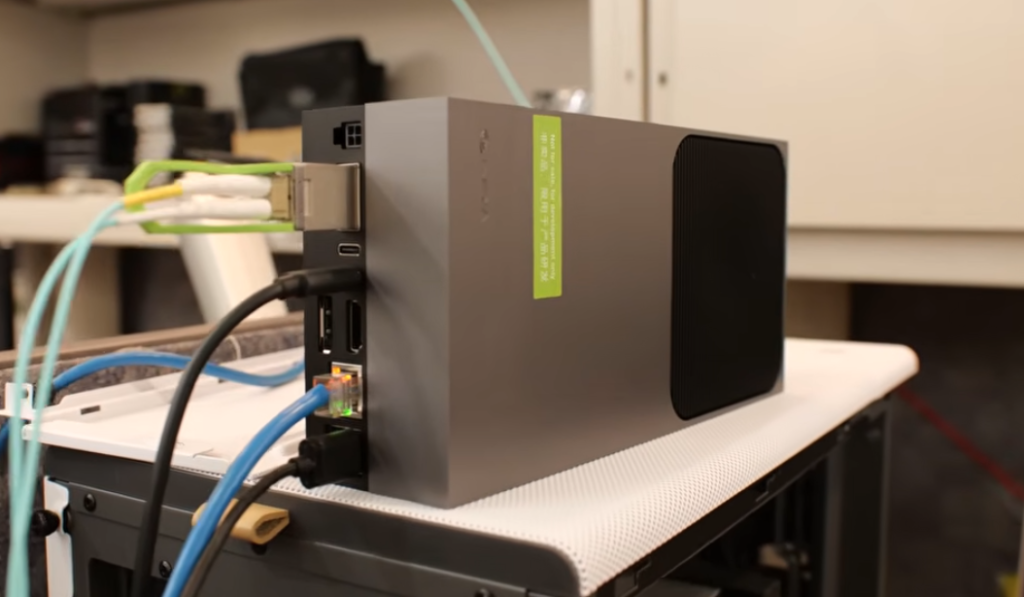
The setup was specifically tested with pi0, although it is extrapolable to other VLAs and policies due to the error arising from a CUDA and PyTorch compatibility problem, which bottlenecks most VLA deployments.
The Hardware: NVIDIA Jetson AGX Thor (Blackwell GPU, SBSA Architecture) Target OS: Ubuntu 24.04 (JetPack 7 / L4T 38.x)
Lates Validated: 23 Feb, 2026
Background
Jetson Thor ships with cuda 13 as part of JetPack 7. Pytorch wheels for this platform are published at pypi.jetson-ai-lab.io and are compiled against CUDA 13.0. However, these wheels have a hard runtime dependency on libcudss.so.0 (CUDA Data-parallel Sparse Solver), which is not included in the system CUDA 13.0 toolkit. Without it, import torch fails immediately.
Furthermore, libcudss.so.0 is only available as a CUDA 12 build, and it in turn depends on libcublas.so.12 and libcublasLt.so.12. These are not the same as libcublas.so.13 — You cannot symlink .so.12 → .so.13 because the ELF version symbols differ. You need the actual CUDA 12 binaries for both cublas and cublasLt.
All three files (libcudss.so.0, libcublas.so.12, libcublasLt.so.12) must be placed in a directory on LD_LIBRARY_PATH. The nvpl/lib/ directory (created by the nvpl pip package) is a convenient location.
Part 1: System Prerequisites
sudo apt update
sudo apt install -y nvidia-jetpack libopenblas-dev python3-venv
sudo reboot
# After reboot, verify the GPU is active:
tegrastats
# or
python3 -c "import torch; print(torch.cuda.get_device_name(0))"
# should print "NVIDIA Thor" Output of tegrastats will show VDD_GPU metric if the installs were successful:

Part 2: Virtual Environment
python3 -m venv ~/thor_env
source ~/thor_env/bin/activate
pip install uvPart 3: Install Pytroch (SBSA Wheels)
Standard PyPI wheels will not work. Use the Jetson-specific index:
uv pip install torch torchvision torchaudio \
--index-url https://pypi.jetson-ai-lab.io/sbsa/cu130This installs PyTorch compiled against CUDA 13.0 (not 12). Then install NVIDIA Performance Libraries for the Grace GPU:
uv pip install nvplThis creates `~/thor_env/lib/python3.12/site-packages/nvpl/lib/` with CPU math libraries (BLAS, LAPACK, FFT, etc.). We will also use this directory as a convenient place to drop the missing CUDA library.
What are SBSA libraries?
SBSA wheels refer to wheels(~ Wheels are precompiled packages that can be easily installed on various platforms, including ARM and x86 architectures) that are compatible with the Server Base System Architecture (SBSA), which is a hardware system architecture based on the Arm 64-bit architecture. These wheels are used in various applications, including CUDA programming and Jetson containers. The wheels are distributed in different formats such as deb, tar.xz, or wheels, and are available on platforms like GitHub and PyPi. The SBSA wheels are designed to ensure compatibility with the SBSA specification, which is crucial for system architecture compliance.
Part 4: The Critical Fix — Inject CUDA 12 Libraries
PyTorch’s libtorch_cuda.so has a hard NEEDED dependency on libcudss.so.0. This library is not shipped with the system CUDA 13.0 toolkit and is not bundled in the PyTorch wheel. Without it, PyTorch cannot initialize CUDA at all.
Additionally, libcudss.so.0 itself depends on libcublas.so.12 and libcublasLt.so.12. The system only has .so.13 versions, and symlinks don’t work — the ELF version symbols inside .so.13 do not satisfy .so.12 requirements. You need the real CUDA 12 binaries.
A. Fix libcudss (Sparse Solver)
wget https://developer.download.nvidia.com/compute/cudss/redist/libcudss/linux-sbsa/libcudss-linux-sbsa-0.6.0.5_cuda12-archive.tar.xz

tar -xf libcudss-linux-sbsa-0.6.0.5_cuda12-archive.tar.xz
cp libcudss-linux-sbsa-0.6.0.5_cuda12-archive/lib/libcudss.so.0 \
   ~/thor_env/lib/python3.12/site-packages/nvpl/lib/

rm -rf libcudss-linux-sbsa-0.6.0.5_cuda12-archive*B. Fix libcublas (Matrix Math) — required by libcudss
wget https://developer.download.nvidia.com/compute/cuda/redist/libcublas/linux-sbsa/libcublas-linux-sbsa-12.4.5.8-archive.tar.xz

tar -xf libcublas-linux-sbsa-12.4.5.8-archive.tar.xz
cp libcublas-linux-sbsa-12.4.5.8-archive/lib/libcublas.so.12 \
   ~/thor_env/lib/python3.12/site-packages/nvpl/lib/
cp libcublas-linux-sbsa-12.4.5.8-archive/lib/libcublasLt.so.12 \
   ~/thor_env/lib/python3.12/site-packages/nvpl/lib/

rm -rf libcublas-linux-sbsa-12.4.5.8-archive*Why this Works?: PyTorch itself links to libcublas.so.13 (from the system) for tis own cuBLAS operations. The CUDA 12 libcublas.so.12 is loaded separately to satisfy libcudss.so.0’s dependency. Both versions coexist at runtime without conflict – they have different sonames.
Part 5: Make the Library Path Permanent
We can tell the dynamic linker to search nvpl/lib/ (where libcudss.so.0 now lives) before system paths:
echo 'export LD_LIBRARY_PATH=/home/artur/thor_env/lib/python3.12/site-packages/nvpl/lib:$LD_LIBRARY_PATH' \
  >> ~/thor_env/bin/activate
# Reload
deactivate
source ~/thor_env/bin/activatePart 6: System-Level Compatibility Symlinks(Optional)
These symlinks may help other CUDA tools that reference older sonames. They are harmless to keep:
# These are NOT needed for PyTorch and were NOT part of the actual fix.
cd /usr/local/cuda-13.0/targets/sbsa-linux/lib
sudo ln -sf libcublas.so.13     libcublas.so.12      # Won't help libcudss (ELF version mismatch)
sudo ln -sf libcublasLt.so.13   libcublasLt.so.12
sudo ln -sf libcudart.so.13     libcudart.so.12
sudo ln -sf libcufft.so.12      libcufft.so.11
sudo ln -sf libcusparse.so.12   libcusparse.so.11
sudo ln -sf libcusolver.so.12   libcusolver.so.11
sudo ln -sf libcupti.so.13      libcupti.so.12
sudo ln -sf libnvrtc.so.13.0.48 libnvrtc.so.12Important: Symlinking libcublas.so.12 → libcublas.so.13 does NOT satisfy libcudss.so.0‘s dependency. The ELF version symbol libcublas.so.12 inside the .so.13 binary does not exist, causing a version 'libcublas.so.12' not found error. This is why you need the actual CUDA 12 cublas binaries from Part 4B.
Verification
source ~/thor_env/bin/activate
python3 -c "import torch; print(f'CUDA: {torch.cuda.is_available()}, Device: {torch.cuda.get_device_name(0)}')"eSummary
| Not in the system CUDA 13 toolkit; PyTorch fails without it. | Source | Why it is needed? |
| PyTorch (cu130) | pypi.jetson-ai-lab.io/sbsa/cu130 | SBSA wheels for Blackwell GPU |
nvpl package | PyPI | CPU math libs (BLAS/LAPACK) for Grace CPU; also provides the nvpl/lib/ directory |
libcudss.so.0 | NVIDIA CUDA 12 redistributables | Not in system CUDA 13 toolkit; PyTorch fails without it |
libcublas.so.12 | NVIDIA CUDA 12 redistributables | Required by libcudss.so.0; system .so.13 cannot substitute (ELF version mismatch) |
libcublasLt.so.12 | NVIDIA CUDA 12 redistributables | Required by libcudss.so.0 |
LD_LIBRARY_PATH → nvpl/lib/ | Added to ~/<env_name>/bin/activate | Makes all three injected libraries discoverable |
.so.12 → .so.13 symlinks | – | NOT needed for PyTorch — harmless legacy from debugging |
FAQ
Why CUDA 13 does not ship libcudds.so.0?
libcudss(CUDA Data-parallel Sparse Solver) is distributed separately from the main CUDA toolkit cia NVIDIA’s redistributables. It is not a part of the standard JetPack/CUDA system packages. NVIDIA publishes it at developer.download.nvidia.com/compute/cudss/redist/, but as of this writing, only CUDA 12 builds are available for the SBSA (aarch64 server) architecture — there is no CUDA 13 build of libcudss yet.
Can’t we just use CUDA 13 for everything and skip CUDA 12 entirely?
Yes, if NVIDIA publishes a CUDA 13 build of libcudss. When that happens, you would only need to drop libcudss.so.0 (the CUDA 13 version) into nvpl/lib/ and the cublas workaround (Step B) would become unnecessary. Until then, the CUDA 12 build of libcudss is the only option, and it drags in CUDA 12 cublas as a transitive dependency.
Are the CUDA 12 cublas libraries conflicting with system CUDA 13 cublas?
No. They have different sonames (.so.12 vs .so.13), so the dynamic linker treats them as separate libraries. PyTorch’s own code uses libcublas.so.13 from the system; the CUDA 12 libcublas.so.12 is only loaded to satisfy libcudss.so.0‘s dependency. Both coexist in the same process without issues.
Alternative
This setup should be easier to achieve by downloading a Docker image with the corresponding library-fixes applied:
# JUST EXAMPLE CODE it has NOT been TESTED
git clone https://github.com/dusty-nv/jetson-containers
cd jetson-containers && sudo bash install.sh
jetson-containers run $(autotag pytorch)Useful Links
Leave a Reply